Pinterest Gone Wild? Here’s How to Fix Your Feed (Without Starting Over)
If your Pinterest home feed looks like a yard sale of random ideas (mine is crazy cluttered)… You are not alone. When I first joined Pinterest, I clicked on everything that caught my eye—recipes, crafts, decorating ideas, quotes, you name it. It was fun at the time… but later? Pinterest Gone Wild? Here’s How to Fix Your Feed (Without Starting Over)
When I first joined Pinterest, I clicked on everything that caught my eye—recipes, crafts, decorating ideas, quotes, you name it. It was fun at the time… but later? Total chaos.
Instead of helpful ideas, I was seeing a mix of things I didn’t even care about anymore.
The good news? You didn’t break Pinterest—and you don’t need to start over.
How to Train Pinterest
My blogger friends, I’m sure you’ve read, like I have, that using Pinterest is great for increasing traffic to your blog. I use my personal Pinterest account, and if your Pinterest home feed looks like a yard sale of random ideas…you are not alone.
When I first joined Pinterest, I clicked on everything that caught my eye—recipes, crafts, dogs, horses, decorating ideas, quotes, you name it. It was fun at the time… but later? I had Total chaos.
Instead of helpful ideas, I was seeing a mix of things I didn’t even care about anymore.
The good news? You didn’t break Pinterest—and you don’t need to start over.
Let me show you how to gently “train” Pinterest to show you what you actually want.
First, a Little Reality Check
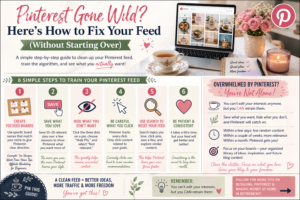
Pinterest no longer lets you edit your “interests” directly, and that’s unfortunate. Instead, it watches what you:
Save
Click
Ignore
Hide
So the goal isn’t to clean everything up manually… It’s to retrain Pinterest to think you like less, not more content.
Step 1: Create a Few Focused Boards
If you only have one or two boards, Pinterest gets confused. Instead, create a few small, specific boards.
Examples:
For a tea blog:
Tea Recipes
Tea Party Ideas
Cozy Tea Time
Tea Journaling
For a work-from-home blog:
Work From Home Tips
Affiliate Marketing for Beginners
Blogging Ideas
Make Money Online
You don’t need dozens—just enough to give Pinterest direction.
Step 2: Save Good Pins (This Is Powerful)
When you see a pin you like in your feed:
Click Save and add it to the most relevant board.
This tells Pinterest:
“Show me more like this.”
Try to save:
10–20 pins in your niche over a few sessions
Step 3: Hide What You Don’t Want
When you see something that doesn’t fit your interests:
Click the three dots
Choose Hide Pin
Select “Not relevant.”
This is one of the fastest ways to clean your feed. Try to hide or choose “not relevant” to about 8 images each day.
Step 4: Be Careful What You Click
Pinterest pays attention to what you click—even out of curiosity. During your cleanup phase:
Only click content related to your niche and avoid random browsing even if you are curious – but use discipline to clean up the clutter.
Even a few clicks can send Pinterest in the wrong direction.
Step 5: Use Search to Reset Your Feed
Search for topics you want to see more of, like:
“tea time ideas”
“blogging tips”
“work from home ideas”
Then:
Click pins
Save a few
Scroll and explore
This helps Pinterest quickly learn your new focus.
Step 6: Don’t Worry About the “ALL” Feed
Here’s something important:
Your “ALL” feed will never be perfect.
It’s designed to show a mix of:
Things you like
Things Pinterest thinks you might like
Instead of trying to clean it completely… Think of it as a place to discover and save what fits your goals.
What to Expect
Within a few days, You’ll notice less random content
Within a couple of weeks, Your feed will feel more relevant
Within a month, Pinterest will feel like it finally “gets you.”
Final Thoughts
If your Pinterest feels messy right now, don’t get discouraged. You didn’t do anything wrong—you just explored.
Now you’re simply giving Pinterest a little direction. And once it starts working with you instead of against you… It becomes one of the most powerful tools for finding ideas, growing a blog, and even making money online.
Key Takeaways
You can’t edit interests—but you can retrain them. Save what you want more of and Hide what you don’t want
Use focused boards to guide Pinterest. Be patient—it improves over time
Want to turn Pinterest into traffic for your blog? That’s exactly what I do on my own blog site
(link to one of your WA posts)
Pinterest doesn’t let you directly edit your “interests” anymore.
Instead, it watches what you:
Save
Click
Ignore
Hide
So the goal isn’t to clean everything up manually…
👉 It’s to retrain what Pinterest thinks you like.


4 Responses
This was such a helpful read—I’ve definitely noticed my Pinterest feed getting a little “off” lately, so this really hit home ????
I like how you explained that you don’t have to start over completely, because honestly that always felt overwhelming to me. It makes a lot more sense to just start guiding the feed back in the right direction with small changes over time, especially since Pinterest is really just showing you more of what you interact with
i’m curious… how long did it take before you started seeing your feed improve after making these adjustments?
Definitely going to try this—thank you for breaking it down so simply!
Kathy, I learned this relatively recently and I’m going into Pinterest and training a little every day so I’ll see if it helps after a while of doing this. Thanks for reading my post and your comment. I hope it helps you. – Shirley
This is such a helpful breakdown, especially for people who feel overwhelmed by a messy Pinterest feed but don’t want to start from scratch. I like how you framed it as training Pinterest instead of fixing it, because that mindset shift makes the process feel much more manageable. The tips about being intentional with clicks and using the hide feature are especially useful, those small actions really do make a difference over time. I also appreciate the realistic expectations you set about the ALL feed never being perfect. That’s something a lot of people misunderstand. Overall, this guide keeps things simple, actionable, and encouraging, which makes it easier for beginners to actually follow through and see results without getting frustrated.
Andrejs, thanks for reading my post and your insights. I’m just back using Pinterest after many years, and I’m learning so much with the help of my ChatGPT AI. I hope to keep learning more about the Platform and how best to use it in the coming months. Thanks again for your comment. – Shirley